Stupid service, disable it.
Get-Service -Name MapsBroker | Set-Service -StartupType Disabled -Confirm:$false
Tuesday, 13 February 2018

Wednesday, 1 November 2017
The remote computer disconnected the session because of an error in the licensing protocol. Please try connecting to the remote computer again or contact your server administrator.
This appears to be caused by a corrupted Registry key on the user's PC, I was able to recreate the issue on a Windows 7 machine by deleting the below key. It should be fixable by importing that key from another PC. A Registry backup should obviously be taken before making any changes.
Location: HKEY_LOCAL_MACHINE\Software\Microsoft\MSLicensing\HardwareID
Key: ClientHWID
Type: REG_BINARY
Location: HKEY_LOCAL_MACHINE\Software\Microsoft\MSLicensing\HardwareID
Key: ClientHWID
Type: REG_BINARY
Tuesday, 5 September 2017
Setting default Start [home] pages in IE
So you want to push your users towards that shiny new web portal. Using a GPO seems the obvious route.
Here's how.
Use a GPO to update a Registry key in the following location.
HKCU\Software\Microsoft\Internet Explorer\Main
Here are the key details for the first tab/single tab.
Action : Update
Hive : HKEY_CURRENT_USER
Key Path: Software\Microsoft\Internet Explorer\Main
Value name (default unticked) : Start Page
Value type : REG_SZ
Value data : http://www.google.co.uk
If you want to add a second tab...
Action : Update
Hive : HKEY_CURRENT_USER
Key Path: Software\Microsoft\Internet Explorer\Main
Value name (default unticked) : Secondary Start Pages
Value type : REG_MULTI_SZ
Value data : http://www.theregister.co.uk
You can set the policy to apply once and not reapply if needed as usual with a Group Policy Object.
Here's how.
Use a GPO to update a Registry key in the following location.
HKCU\Software\Microsoft\Internet Explorer\Main
Here are the key details for the first tab/single tab.
Action : Update
Hive : HKEY_CURRENT_USER
Key Path: Software\Microsoft\Internet Explorer\Main
Value name (default unticked) : Start Page
Value type : REG_SZ
Value data : http://www.google.co.uk
If you want to add a second tab...
Action : Update
Hive : HKEY_CURRENT_USER
Key Path: Software\Microsoft\Internet Explorer\Main
Value name (default unticked) : Secondary Start Pages
Value type : REG_MULTI_SZ
Value data : http://www.theregister.co.uk
You can set the policy to apply once and not reapply if needed as usual with a Group Policy Object.
Wednesday, 30 August 2017
RemoteApp on Windows 7 client prompts for credentials second time and says Login Failed
Sometimes people have older PC's that you have to support. I know right, FFS...
A perfectly functional RDS RemoteApp deployment (in Win 8 - 10) will give you a Login Failed password prompt when launching an app from the web portal.
Your primary suspect should be HTTP Redirection in IIS. Turn it off!

To bump people from the default HTTP site to RDWeb use the following html file customised with your domain.
<html>
<head>
<title>RDWeb redirect</title>
<META http-equiv="refresh" content="0;URL=https://remote.EXAMPLE.co.uk/RDWeb/">
</head>
<body bgcolor="#ffffff">
<center>Forwarding you to https://remote.EXAMPLE.co.uk/RDWeb/ <a href="https://remote.EXAMPLE.co.uk/RDWeb/"> https://remote.EXAMPLE.co.uk/RDWeb/</a>
</center>
</body>
</html>
A perfectly functional RDS RemoteApp deployment (in Win 8 - 10) will give you a Login Failed password prompt when launching an app from the web portal.
Your primary suspect should be HTTP Redirection in IIS. Turn it off!

To bump people from the default HTTP site to RDWeb use the following html file customised with your domain.
<html>
<head>
<title>RDWeb redirect</title>
<META http-equiv="refresh" content="0;URL=https://remote.EXAMPLE.co.uk/RDWeb/">
</head>
<body bgcolor="#ffffff">
<center>Forwarding you to https://remote.EXAMPLE.co.uk/RDWeb/ <a href="https://remote.EXAMPLE.co.uk/RDWeb/"> https://remote.EXAMPLE.co.uk/RDWeb/</a>
</center>
</body>
</html>
Thursday, 24 August 2017
DNS name resolves wrongly on Windows
I had an issue where a DNS record was updated but a Windows PC would not see the change, even adding an entry in the hosts file was ignored.
Running the following in an elevated command prompt fixed the issue.
netsh int ip reset resetlog.txt
Running the following in an elevated command prompt fixed the issue.
netsh int ip reset resetlog.txt
Tuesday, 25 July 2017
Change published FQDN for Server 2012 or 2012 R2 RDS Deployment
Change published FQDN for Server 2012 or 2012 R2 RDS Deployment.
https://gallery.technet.microsoft.com/Change-published-FQDN-for-2a029b80
https://gallery.technet.microsoft.com/Change-published-FQDN-for-2a029b80
Add a full remote desktop to a RemoteApp Session Collection
Go to...
HKLM\SOFTWARE\Microsoft\Windows NT\CurrentVersion\Terminal Server\CentralPublishedResources\PublishedFarms\<collection>\RemoteDesktops\<collection>
HKLM\SOFTWARE\Microsoft\Windows NT\CurrentVersion\Terminal Server\CentralPublishedResources\PublishedFarms\<collection>\RemoteDesktops\<collection>
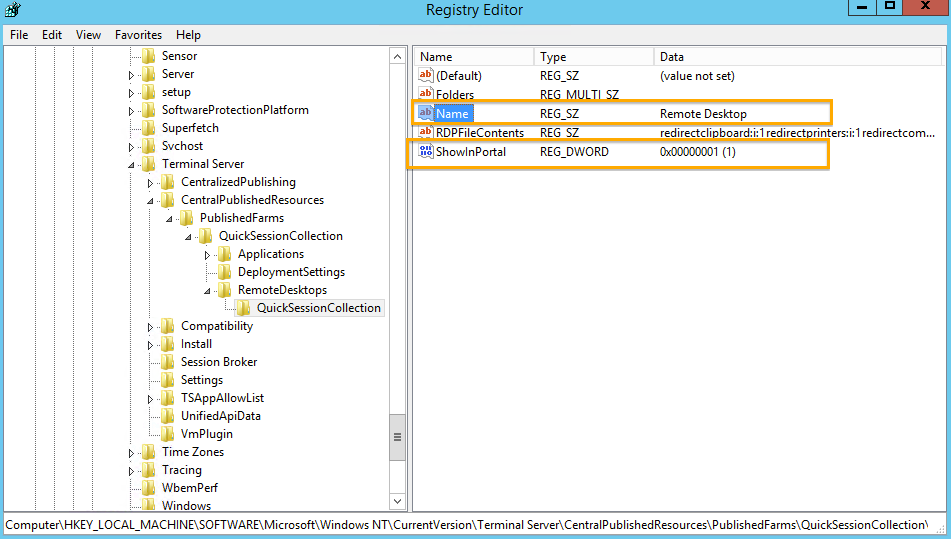
To show the Desktop Session Icon, Change the value (ShowInPortal) to 1 from 0.
You can also rename the Desktop Session Icon name to something more to your liking. To do this, change the value (Name).
Wednesday, 19 July 2017
Labtech agent keeps reinstalling?
How to remove Labtech agent.
Right-click PC or Company.
Scripts/Maintenance/Agent/Offboarding
Right-click PC or Company.
Scripts/Maintenance/Agent/Offboarding
Monday, 12 June 2017
Thursday, 4 May 2017
Giving all users Reviewer access to a mailbox calendar (works on resource calendars too)
Connect to Office365 Exchange online or open your local Exchange PowerShell.
Set-MailboxFolderPermission "MailboxName:\calendar" –User default –AccessRights reviewer
Set-MailboxFolderPermission "MailboxName:\calendar" –User default –AccessRights reviewer
Wednesday, 3 May 2017
Some Hyper-V guests loose network connectivity
Host has network, some guests have network and some do not.
It's a known problem with some network drivers and an update will resolve the issue, however you can also turn off a feature for a live running fix.
Set-NetAdapterVmq -Name "NIC 1" -Enabled $False
It's a known problem with some network drivers and an update will resolve the issue, however you can also turn off a feature for a live running fix.
Set-NetAdapterVmq -Name "NIC 1" -Enabled $False
Sunday, 30 April 2017
Raspberry Pi LCD Screen rotation
So you have your 7" Pi touch screen, but you have a case that mounts it upside down or need the connectors on the other side, what do you do?
Thankfully there is a very simple fix for this.
1, Edit the file /boot/config.txt
2, Insert the text 'lcd_rotate=2' at the top of the file.
3, Save and close then reboot.
This will also rotate the touch screen function to match the LCD panel.
Thankfully there is a very simple fix for this.
1, Edit the file /boot/config.txt
2, Insert the text 'lcd_rotate=2' at the top of the file.
3, Save and close then reboot.
This will also rotate the touch screen function to match the LCD panel.
Subscribe to:
Posts (Atom)